iOS · Jan van Haasteren

JVH Puzzle

JVH Puzzle

The collector’s companion for Jan van Haasteren. Scan boxes, track sessions, follow friends, and keep your progress close with Live Activities, widgets, and Apple Watch.

#1 Lifestyle Paid on the App Store · Netherlands

Download on the App Store

The puzzles

What are Jan van Haasteren puzzles?

Jan van Haasteren is a Dutch illustrator whose jigsaw puzzles are famous for chaotic, humorous scenes. Every box is packed with tiny characters, side jokes, and details you only notice after hours at the table.

The brand is huge in the puzzle world. With well over a thousand different puzzles released over the years, fans collect across piece counts, themes, and special editions. In the Netherlands and far beyond, Van Haasteren boxes are a familiar sight in shops, living rooms, and on collectors’ shelves.

They are not “just another puzzle.” Collectors hunt rare editions, compare piece counts, and often own dozens, or hundreds, of boxes. The hobby is visual, social, and very physical: shelves of cardboard, sorting trays, and long evenings building one scene at a time.

That passion is the starting point of JVH Puzzle. Not a tech problem first, but a collector’s world that needed a clearer way to keep track.

Capabilities

What you can do

Everything a serious Van Haasteren collection needs, without turning the hobby into admin.

Collect

01

Puzzle catalog

Complete Jan van Haasteren database with search, filters, and detail pages.

02

Barcode scanning

Point the camera at a box and add it, without typing titles.

03

Collection tracking

Statuses, sessions, missing pieces, analytics, and export.

04

Action Button

Assign Scan Barcode to the iPhone Action Button and open the scanner from the side of the phone, without digging through menus.

Stay close

05

Live Activities & widgets

Session progress on Lock Screen and Dynamic Island, plus Home Screen widgets.

06

Groups & Following

Stay connected with other collectors without the noise of a social network.

07

Apple Watch

Active, Collection, Following, and Statistics on your wrist.

08

Advent Calendar

A seasonal Home Screen widget for collectors, with daily puzzle moments through December.

From hobby to product

Making the non-technical feel technical

Collecting puzzles starts with cardboard and patience, not with apps. Spreadsheets help for a while, until the collection grows and the overview disappears.

JVH Puzzle was built to stay in the background of that hobby: native iOS where it helps, invisible where it does not. The craft is technical. The experience should still feel like collecting.

On the wrist

Apple Watch companion

Built so you can keep puzzling without picking up your phone. Start or check an Active session, open My Collection, Following, or Statistics, and stay up to date while your hands stay on the pieces.

Native watchOS UI, synced through WatchConnectivity.
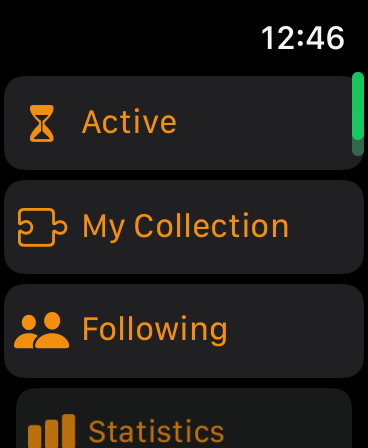
JVH Puzzle on Apple Watch showing Active, My Collection, Following, and Statistics

Product

More from the app

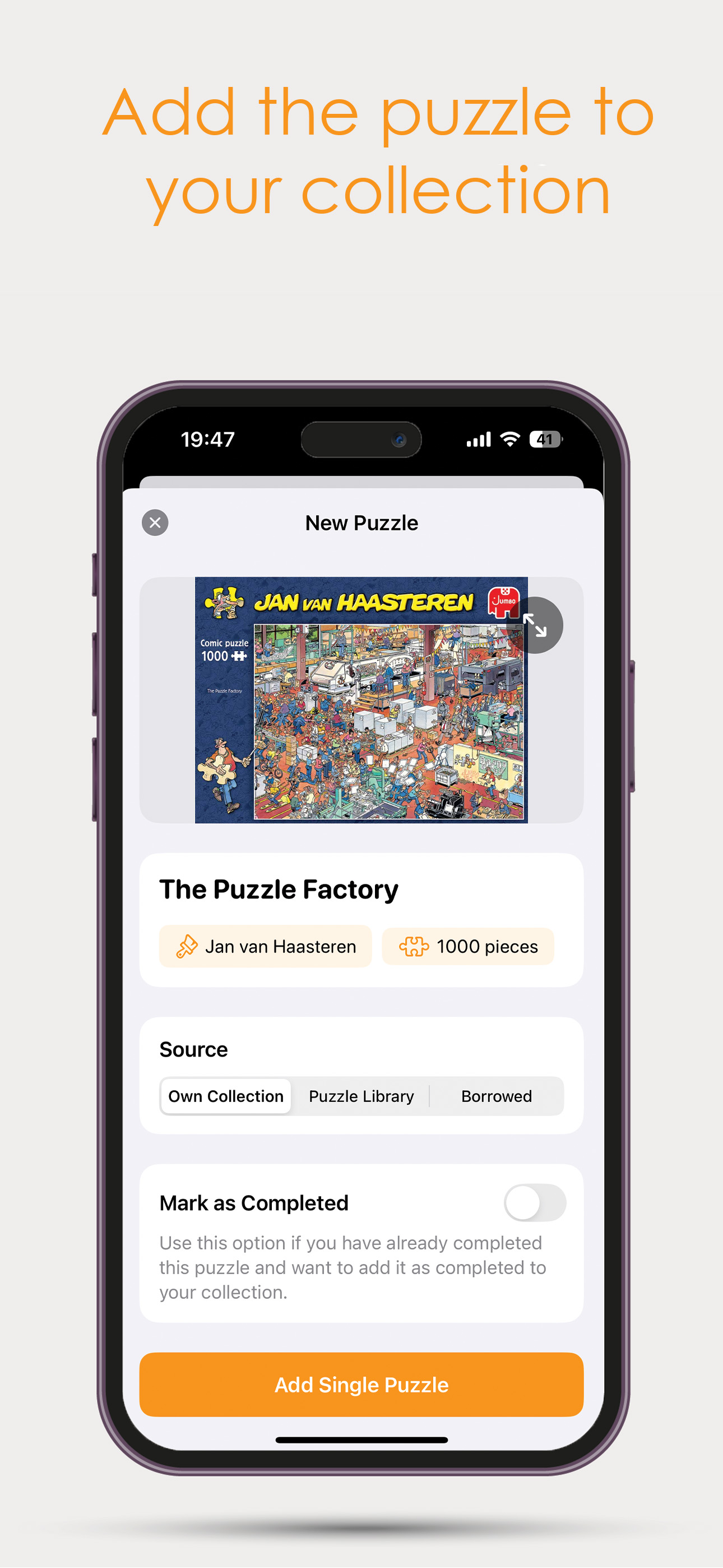
Add to your collection
Add to collection
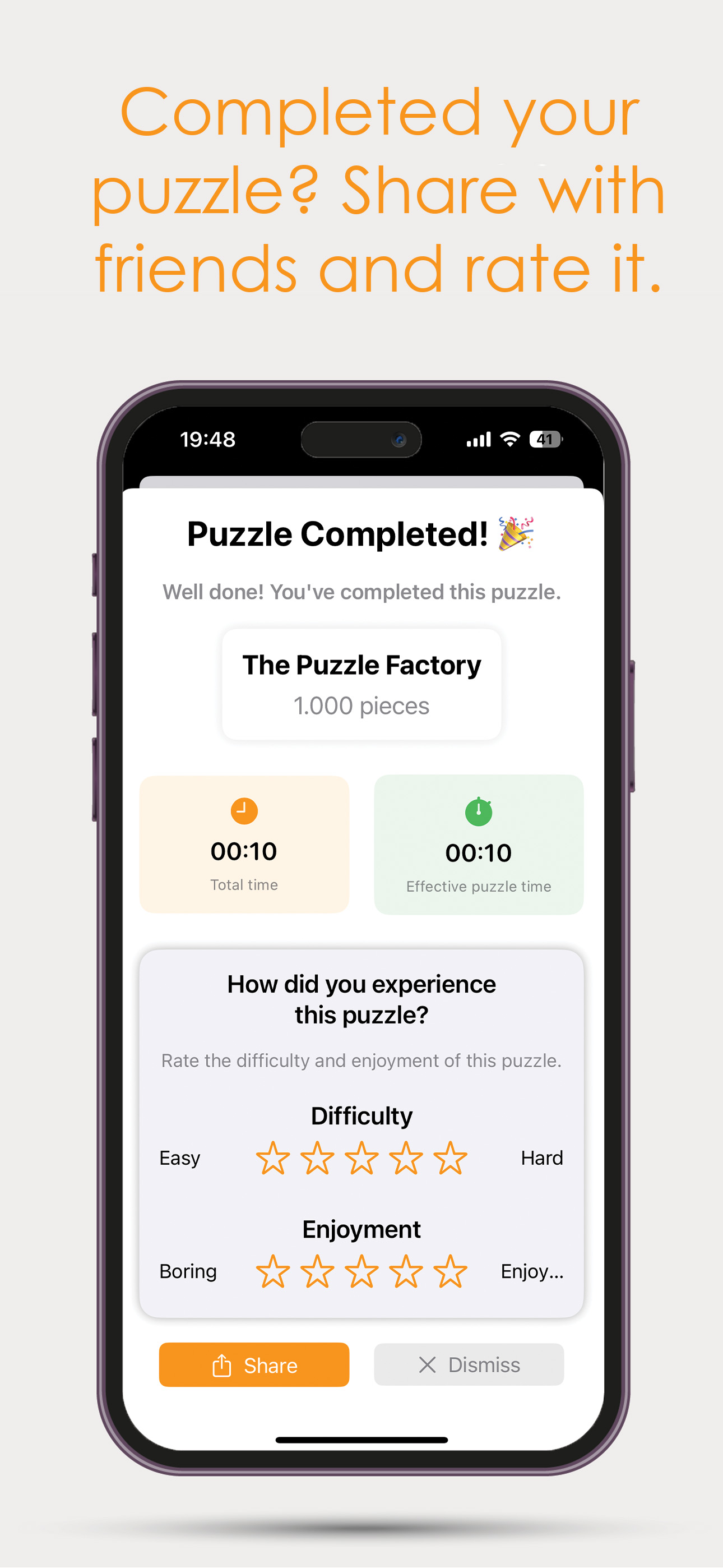
Completed collection
Completed
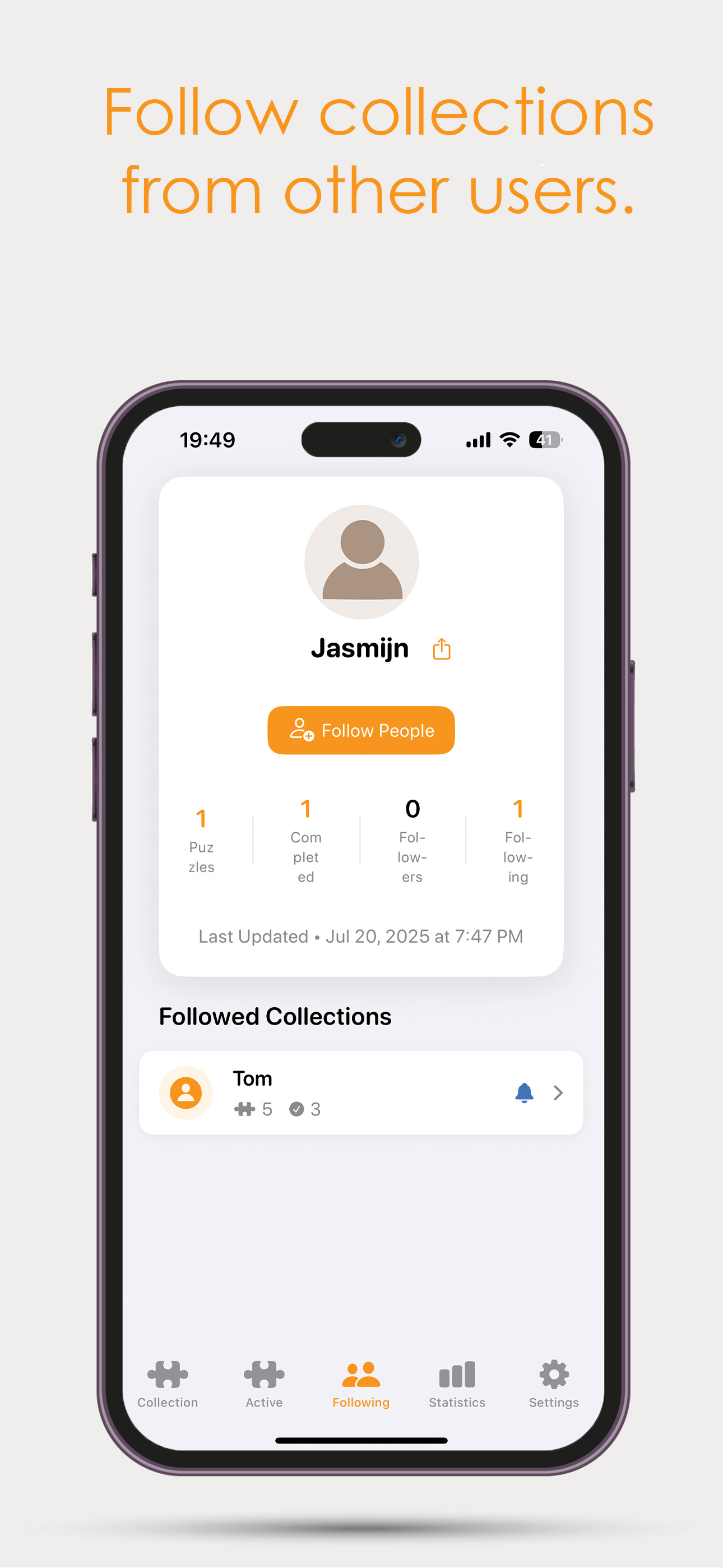
Following collectors
Following
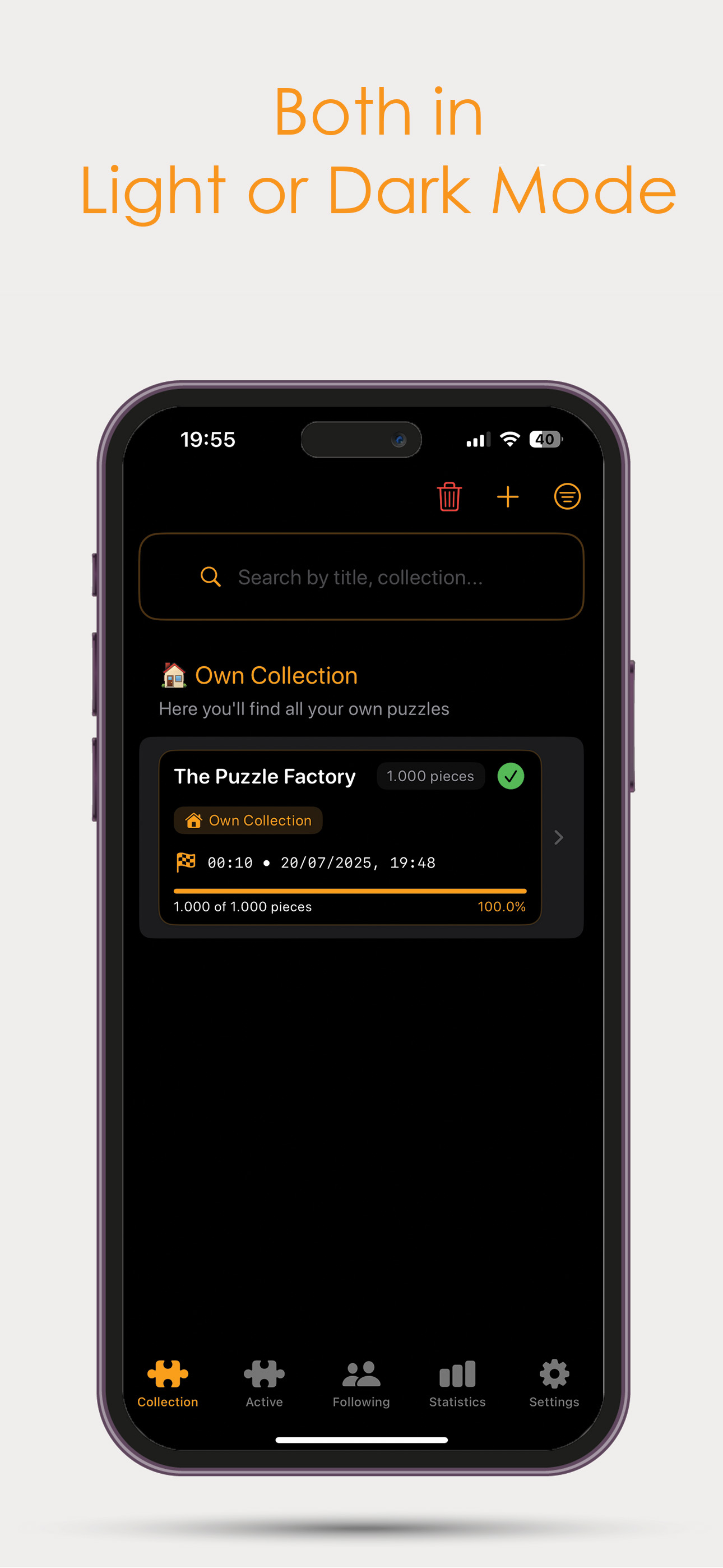
Light and dark mode
Light & dark

Built with

Tech stack

Native Apple frameworks first, with Firebase where sync and community need a shared backend.

Swift

Swift & SwiftUI

Native iOS foundation and interface. Fast, platform-first UI without a cross-platform wrapper.

Scan

Vision

On-device barcode recognition so a box can enter your collection without typing titles.

Live

ActivityKit

Live Activities on Lock Screen and Dynamic Island while a puzzle session is running.

Home

WidgetKit

Home Screen widgets for collection stats and Advent Calendar at a glance.

Wrist

WatchConnectivity

Keeps the Apple Watch companion in sync so sessions and stats stay current without opening the phone.

Hardware

App Intents

Powers Shortcuts and the iPhone Action Button, so Scan Barcode is one press away.

Cloud

Firebase

Sync, accounts, Groups, and Following across devices when collectors want a shared layer.

On-device

Core ML

On-device intelligence where it helps the collector flow stay fast and private.

Camera

AVFoundation

Camera pipeline behind barcode scanning, so opening Scan Barcode goes straight to a live viewfinder.

Journey

Milestones

Key moments in JVH Puzzle’s path on the App Store.

Updates

Changelog

  • Puzzle Radar for want / offer / match
  • Chat with matches
  • Listing visibility: groups, followers, or both
  • Catalog notification false positives fixed
  • Profile photo from Settings (camera or library)
  • Link EAN to catalog puzzle while scanning
  • Prefill scanned EAN and pick article number
  • Stub created when puzzle missing from scan DB
  • Search and Following UX
  • Privacy settings and scanner improvements
  • App Shortcuts and performance
  • Polish and stability improvements
  • Following and Groups refinements
  • Redesigned Groups and widgets
  • Following updates
  • King’s Day smart scan
  • Sort by release year
  • Improved puzzle number formatting
  • Groups Discover and location search
  • Apple Sign-In username handling
  • Followers widget
  • Change email in Account Management
  • Statistics tracking fix for completed puzzles
  • Negative time calculation fix
  • Swipe action text refinement
  • Major internal optimization
  • New internal EAN mapping system
  • Scan improvements
  • Duplicate article number resolution
  • "Missing pieces" option during add flow
  • EAN submission option
  • Clearer add puzzle options
  • Expanded Catalog functionality
  • Fully improved Article number flow
  • Custom section ordering
  • Collection scrolling fix
  • Active puzzle visual refinement
  • New collection source: Loaned out
  • Improved puzzle adding flow
  • Sorting and filtering improvements
  • Section counters
  • Collection export
  • Start option with or without timer
  • Expanded Group functionality
  • Manual completion date
  • Combo box improvements
  • New AS Watson puzzle support / Nieuwe AS Watson puzzels
  • Competition logging
  • Clearer duplicate indication when adding puzzles
  • New filter by number of pieces
  • Swipe action: Mark as completed
  • Updated Info button
  • Improved handling of combo puzzles when marking as sold
  • Enhanced combo box detection
  • Duplicate puzzle check when adding
  • Multi-select edit mode in Collection view
  • New customization options in Settings
  • Logout issue fixed + backup option added
  • Improved Detail view
  • New Status section with manual time input
  • New Apple Developer Account
  • Apple Watch Companion App
  • Improved feedback flow
  • Push notifications for new JVH puzzles
  • Happy New Year! I hope you've had some wonderful days to start the year
  • Fixed an issue where puzzle ratings were not displayed correctly in the detail view and collection v
  • → Ratings are now shown consistently everywhere
  • Fixed a language issue where Collection appeared in English while the app was set to Dutch
  • Added a behind-the-scenes improvement to the rating system
  • This is one of the biggest updates so far
  • The collection view has received a refined layout — same philosophy, but more modern and cohesive
  • Previously, swiping triggered a frame around the item and animated buttons, which made it feel slow
  • Accidentally deleting a puzzle is now impossible:
  • The section headers have been redesigned:
  • The 2025 Advent Calendar puzzle was incorrectly set to 1000 pieces, but the correct count is 1296
  • A dedicated widget for the 2025 Advent Calendar puzzle has been added
  • Perfect for counting down to Christmas!
  • How to set it up:
  • The daily timeline view has been improved
  • The timeline was previously exclusive to iPad, but starting in Version 1
  • A brand-new widget is now available, showing your:
  • See your puzzle stats right from your Home Screen
  • This update is big not in appearance, but in everything you don't see
  • Last week I completely rebuilt the entire system for backup, synchronization, and recovery
  • Let's dive in:
  • Previously, the "Restore Data" button could cause serious problems:
  • With Version 1
  • On October 31st, we reached an incredible milestone — JVH Puzzle hit number 1 in the Lifestyle (paid) category
  • After many times being number 2, it finally happened: JVH Puzzle is officially number 1
  • There are over 6,100 apps in the Lifestyle category, so being at the very top feels truly unreal
  • I'm incredibly proud, but most of all grateful to the amazing community that made this possible
  • This called for a big, celebratory update
  • New — Local Photo Storage: Your own photos are now stored in Documents/PuzzleImages/ instead of UserDefaults
  • Privacy-friendly: Your photos stay entirely on your device — Only puzzle metadata is synced to the cloud
  • Fixed an issue where the "Edge Pieces Placed" switch in the Active tab bounced back unexpectedly
  • Added a new onboarding experience for new users
  • Introduced SharePlay (Beta) — You can now share an active puzzle live with another user and solve it together
  • Added support for the 2024 Advent Calendar — It now works the same way as the 2025 version
  • Bug fixes and stability improvements
  • Added a username check in Settings (under Account) so you can always see your display name
  • Cleaned up the Settings screen for a clearer layout
  • Bug fixes and stability improvements
  • New: Added support for iOS 26
  • Improved: Moved the search field from the collection view and active view to the toolbar — Improved the icon
  • Improved: Updated the order and naming in the + list: "Add single Puzzle" → Single Puzzle, "Add Bulk" → Bulk
  • I'm back from vacation and that means it's time for fresh updates!
  • New: Added the option to add a note in the detail view
  • Removed several unintended local push notifications that were still being triggered — Things should
  • Moved the Delete All (trash) icon to the Settings screen — This is a more natural and safer place
  • Introduced a new section: Wishlist — When adding a puzzle, select "Wishlist" as the source to place it there
  • Also added the option to reset back to the default image when editing a puzzle photo
  • Fixed a bug introduced in version 1
  • The AR experience is now properly translated into English
  • Added a swipe tutorial for new users — Many people mentioned they didn't realize you could swipe puzzles
  • Added a new rating feature when completing a puzzle — You can now rate each puzzle on Difficulty and Enjoyment
  • Introduced a new sorting system for your puzzles — Available in both the Collection and Active views
  • Added a bulk import option — quickly add multiple puzzles at once, perfect for large collections
  • Share button in Following collection
  • Fix Delete All on server
  • Fix stray notification when starting puzzle
  • Removed test features in Settings
  • Official First Release