
JVH Puzzle
 iOS
🏆
Reached #1 in Lifestyle Paid (iPhone) — 31 Oct 2025
🏆
Reached #2 in Lifestyle Paid (iPad) — 5 Feb 2026
iOS
🏆
Reached #1 in Lifestyle Paid (iPhone) — 31 Oct 2025
🏆
Reached #2 in Lifestyle Paid (iPad) — 5 Feb 2026

What are Jan van Haasteren puzzles?
Jan van Haasteren puzzles are a beloved series of jigsaw puzzles known for their distinctive, humorous illustrations filled with hidden details, recurring characters, and witty visual jokes. Created by Dutch illustrator Jan van Haasteren, these puzzles feature vibrant, busy scenes where every corner tells a story. Popular among puzzle enthusiasts worldwide, JVH puzzles come in various piece counts and are organized into different series, making them a favorite for collectors who enjoy tracking their collection, progress, and discovering new releases.
Why JVH Puzzle needed to exist
Existing puzzle tracking apps had fundamental problems: manual entry, no comprehensive database, and outdated design. JVH Puzzle solves this with a complete database of all 1008+ Jan van Haasteren puzzles, automatic barcode scanning, real-time collection tracking, and modern iOS features like Live Activities, Widgets, and Apple Watch support. Built specifically for JVH fans with series, artist, and piece count data built-in, it's the puzzle tracker that finally moves with the times. Everything you need to manage your collection is right at your fingertips.
iOS Experience
So the journey started. We created a complete iOS experience that goes beyond just tracking puzzles it is an ecosystem built around the Main App and extended with focused companion features.
Includes:
Widgets
Choose a widget option to preview details.
Live Activities
Track progress from Lock Screen and Dynamic Island. Real-time updates without opening the app.
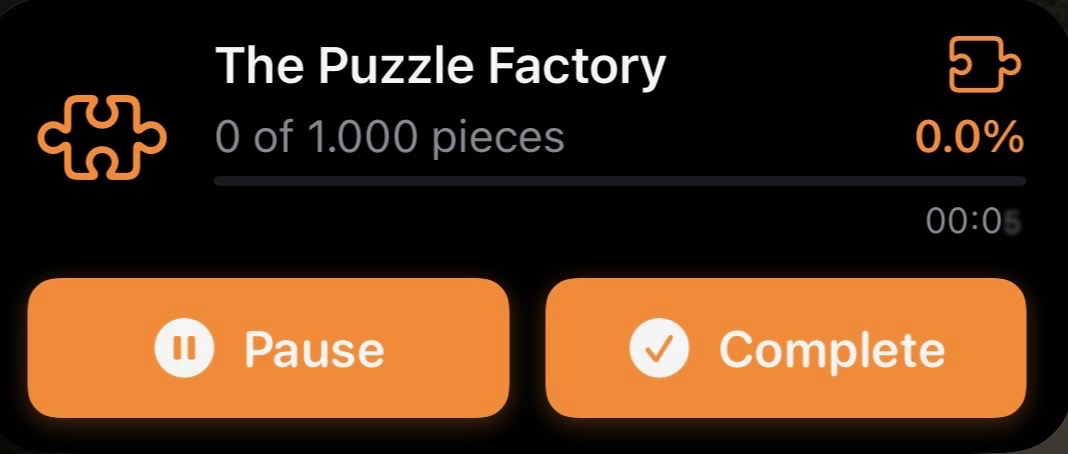
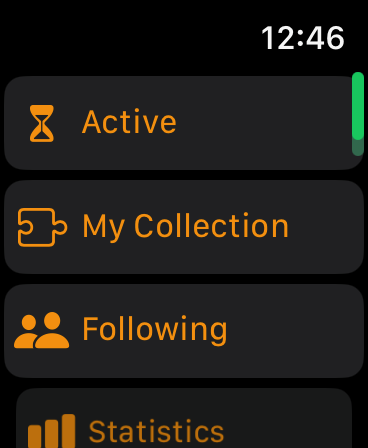
Apple Watch
Companion app for Apple Watch. Track active puzzles and update progress from your wrist.
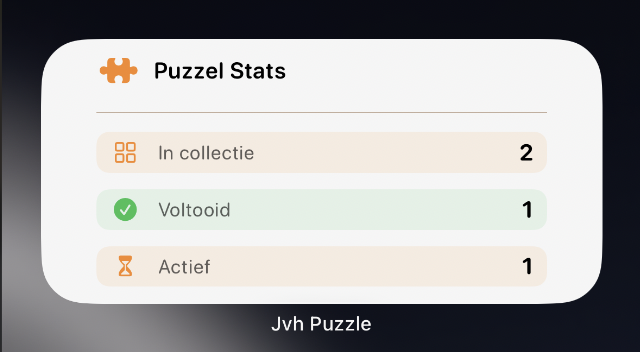
Stats Widget
Track your collection stats at a glance. See total puzzles, completed count, and progress. Choose which stats to display when you add the widget.
Built with modern technology
The tools and technologies that power JVH Puzzle
Screenshots
Explore the app through these screenshots
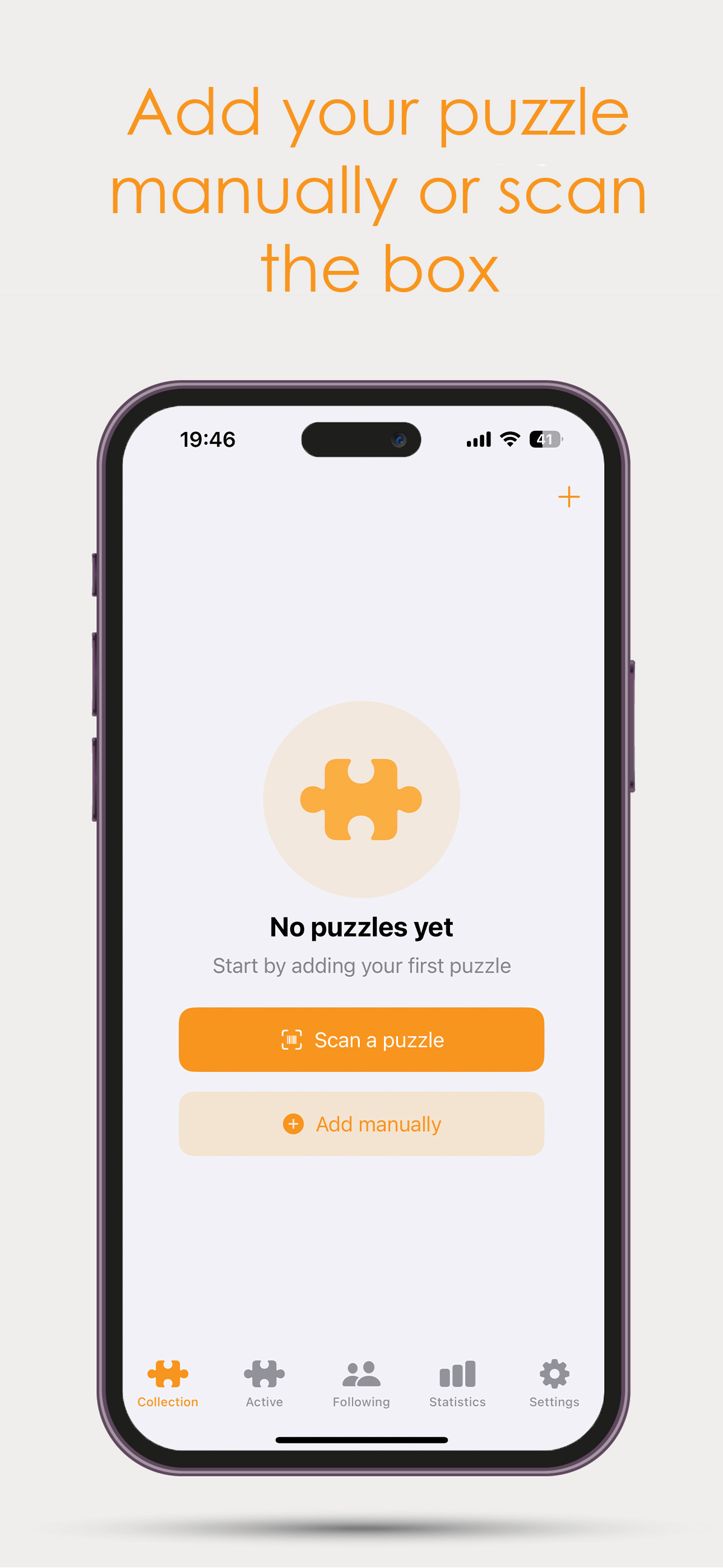
Add Puzzles
Easily add puzzles to your collection by scanning barcodes or searching the complete catalog of 1008+ Jan van Haasteren puzzles.
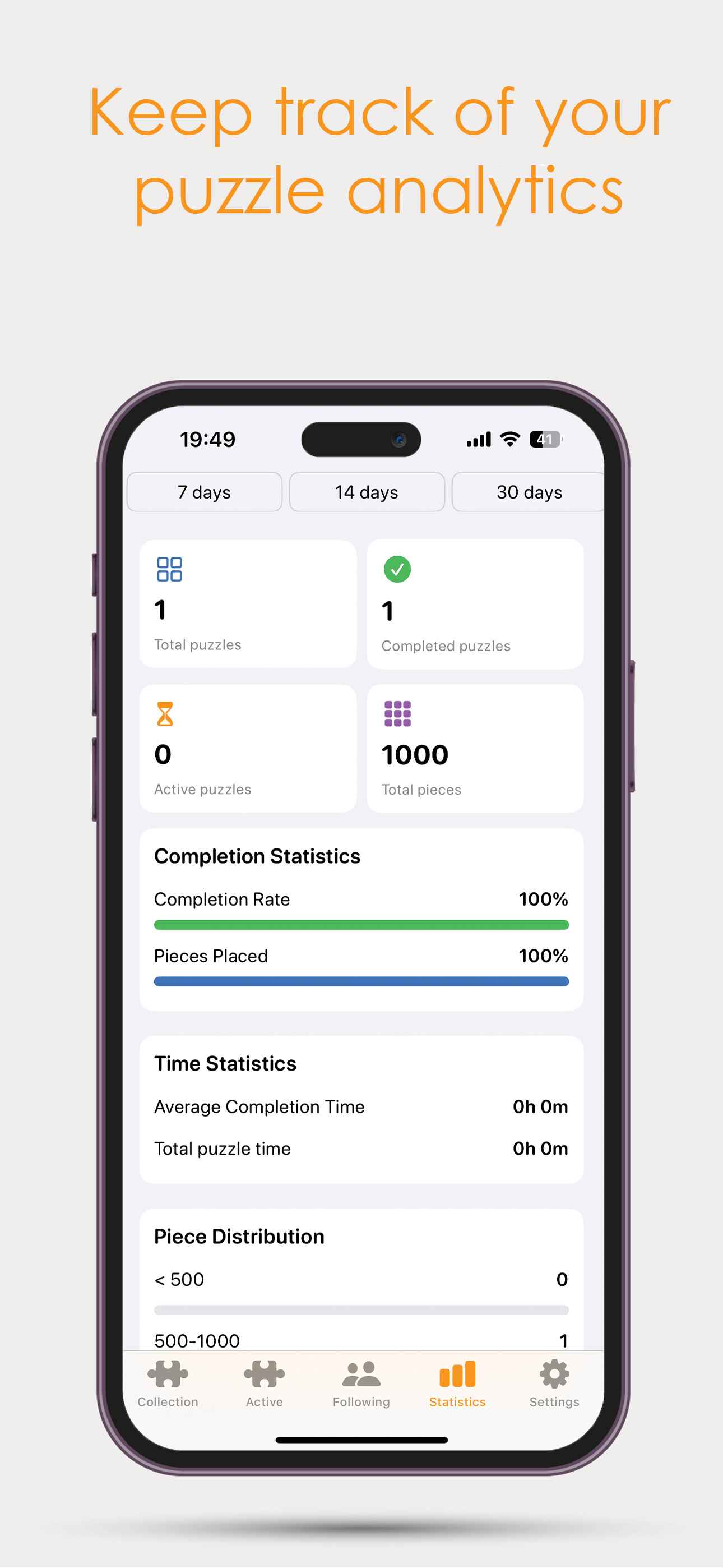
Analytics & Statistics
Track your progress with detailed statistics. See how many puzzles you've completed, your collection size, and session analytics.
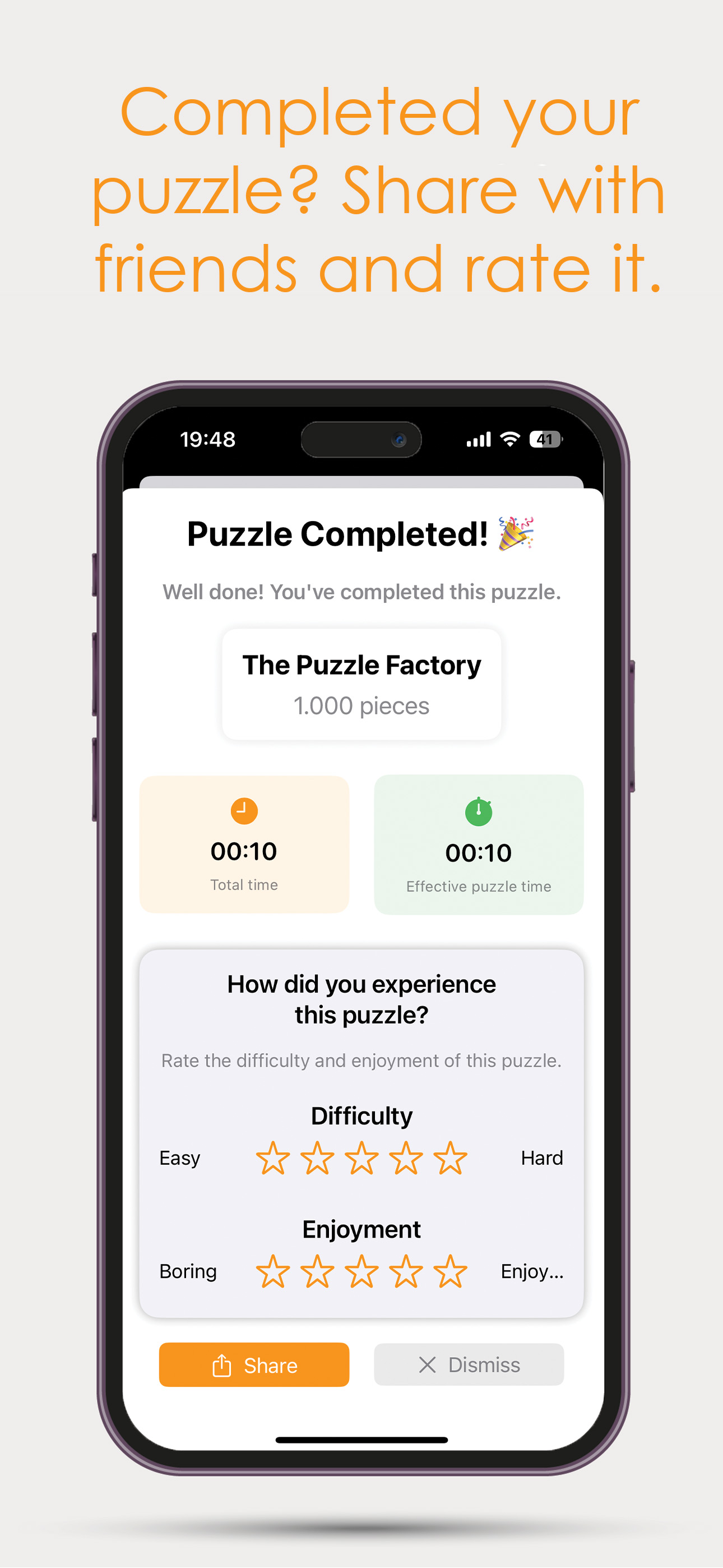
Completed Puzzles
View all your completed puzzles in one place. Track your achievements and see your progress over time.
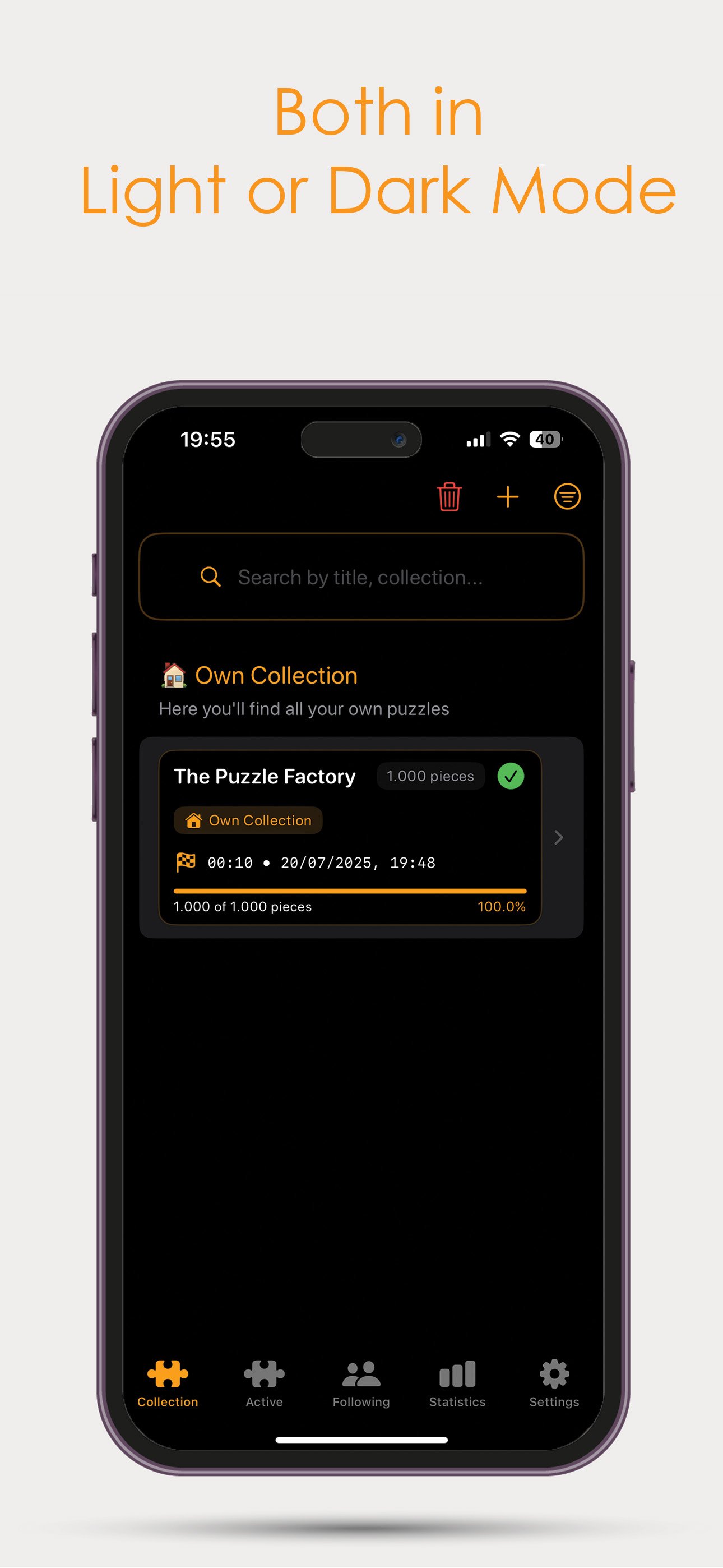
Light & Dark Mode
Switch between light and dark mode for comfortable viewing in any environment. The app adapts to your system preferences.
Publications
Articles and mentions
Changelog
Recent updates and improvements
Version 1.32 introduces new sorting functionality, improvements to the Groups feature, and refinements to account handling and UI consistency. This update focuses on improving usability while continuing development of the social group system.
What's new and improved:
- New sorting option: Release Year
A new sorting option has been added that allows puzzles to be sorted by Release Year. Available options: Newest first and Oldest first. This sorting option is available in both the Collection view and the Active puzzles page. - Improved puzzle number formatting
Puzzle numbers in the Add Puzzle view previously displayed formatting such as 1.026. The separator has been removed to keep numbering consistent with the rest of the app. - Groups section improvements (Following)
The Groups section now includes a new toolbar for easier navigation and discovery. You can search for groups based on location, specify a location when creating a group, and choose whether your group is discoverable via the new Discover feature. Groups will continue to evolve as new functionality is gradually introduced. - Improved Apple Sign-In username handling
Previously, some users who signed in with Apple were assigned the default name “User”, and custom names could revert after validation checks. This has been resolved by storing the custom name locally so it no longer resets. - Ongoing social feature development
The Groups functionality continues to receive incremental improvements as development progresses.
Version 1.31 introduces new social functionality, account management improvements, and important fixes to statistics tracking and time calculations. This update improves accuracy, usability, and overall polish across the app.
What's new and improved:
- New Followers Widget
A new widget has been added, allowing you to quickly see who follows you and who you are following. This makes social activity more visible and accessible at a glance. - Email address change option
Users who signed in with email can now change their email address directly within the app. You can find this option under Settings → Account Management. This feature was added based on user feedback. - Statistics tracking fix (Completed puzzles)
An issue was reported where some completed puzzles did not update statistics correctly. This occurred when a puzzle was marked as completed directly via swipe in the Collection view. In certain cases, the validation logic was too strict, causing statistics not to update. This logic has now been corrected. Statistics update reliably again, including when completing via swipe. - Negative time calculation fix (Android feedback)
An issue was identified where adjusting the completion date (for example, setting it to yesterday after marking a puzzle as completed) could result in a negative time value being displayed. This has been resolved. Time values will now never go below 00:00. - Swipe action text refinement (English)
In the English version of the app, the text "Mark as completed" was visually truncated in the Collection swipe action due to limited space. The label has been refined to "Mark Completed" for improved readability and visual consistency. - General stability improvements
Minor internal refinements and cleanup for improved reliability.
Version 1.30 is a major optimization update focused on performance, data control, scanner reliability, and overall consistency across the app. This update introduces significant internal improvements and structural refinements to make the app faster, smarter, and more future-proof.
What's improved:
- Major internal optimization
Large parts of the app now store data locally instead of relying on external requests. This results in noticeably faster performance, improved stability, and reduced dependency on third-party services. - New internal EAN mapping system
The puzzle scanner relies on EAN barcodes, but no complete public EAN database for puzzles exists. Previously, the app depended fully on an external barcode lookup service. While this worked well for older puzzles, newer releases often lacked proper mapping.
A new internal EAN-to-article-number system has now been built and self-hosted. The app now first checks the internal database and falls back to the external lookup service if needed. This ensures faster recognition of new puzzles and allows missing codes to be added quickly. - Scan improvements
The Scan feature now uses the new internal EAN system, improving reliability and future expandability. - Duplicate article number resolution
An issue was identified where some puzzles shared the same article number, causing catalog inconsistencies. This has been resolved while maintaining strict duplicate puzzle detection. Duplicate puzzles are now detected more reliably when adding them to your collection. - "Missing pieces" option during add flow
Users can now indicate missing pieces directly while adding a puzzle. For combo boxes, this is requested per individual puzzle. This removes the need to edit puzzles afterward. - EAN submission option
A new option allows users to submit unknown EAN codes. Available in Settings under Feedback, and prompted automatically when a scan cannot find a match. This helps expand and improve the internal database over time. - Active page empty state refinement
The empty state of the Active page has been redesigned to better match the Collection view, creating stronger visual consistency. - Settings feedback restructuring
All feedback-related options are now grouped together in one dedicated section. Previously, options were shown only after selecting "Send Feedback." The layout is now clearer and more consistent with the rest of Settings. - Advent Calendar fixes
While working on the Advent Calendar feature: Collection view icons were resized for better visual balance, and an issue affecting Day 20 has been resolved. - iPad add flow consistency
When adding a puzzle on iPad, the source selection previously differed from iPhone. This has now been unified for a consistent cross-device experience.
Version 1.29 is a refinement update focused entirely on quality, consistency, and usability improvements across the app. This update includes many carefully considered adjustments and visual improvements.
What's new and improved:
- Clearer add puzzle options
When tapping the '+' button in the collection view, you will now see three clearly defined options: "Catalog," "Scan," and "Article number." These options previously existed but were inconsistently named; they have now been unified into three clear and logical ways to add puzzles. - Expanded Catalog functionality
The Catalog has been improved and extended. A new multi-select button has been added, allowing you to select multiple puzzles at once.
Puzzle information now displays the release year instead of the build time, which is more relevant when adding puzzles to your collection.
An issue where puzzles without an article number were not being retrieved correctly has been resolved, and all puzzles without an article number are now properly loaded and displayed. - Fully improved Article number flow
The Article number feature has been completely reworked. It previously lacked functionality available in Scan and Catalog. Now, all options have been aligned to provide a consistent experience across all three add methods. - Custom section ordering
In the collection view toolbar, tapping "Edit" now reveals a new option called "Section order." This feature allows you to rearrange sections and create your own custom layout. - Collection scrolling fix
Scrolling in the collection view has been fully rebuilt. Previously, puzzle items visually overlapped section headers during scrolling. This has been resolved, leading to a cleaner and more stable scrolling experience. - Active puzzle visual refinement
The large puzzle piece icon shown when starting a puzzle has been removed. Active puzzles are now indicated solely by a subtle orange border. When a puzzle is marked as completed, the orange border disappears. This creates a cleaner and more minimal visual hierarchy. - Improved piece count formatting
Piece counts are now displayed without thousand separators (e.g., "1000" instead of "1.000"). This creates a cleaner and more consistent appearance. - Timer logic correction
If a puzzle is started without a timer, pause and timer controls are no longer available in the active state. This ensures consistent behavior and removes unnecessary options. - Settings layout improvements
Improved spacing at the bottom of the Settings screen. Version information is now better aligned with consistent margins. Background color has been corrected to match the rest of the app for visual consistency. - Refined rating flow
When tapping "Rate this puzzle" in the detail view, only the rating component is now shown. The full completion sheet is no longer displayed unnecessarily, making the flow faster and more focused.
Version 1.28 includes several user-requested improvements, new collection options, and quality-of-life enhancements across the app.
What's new and improved:
- New collection source: Loaned out
A new Loaned out source has been added to the collection. This option has been implemented across multiple screens to ensure a consistent and natural user experience. - Improved puzzle adding flow
When adding a puzzle and selecting it from the list, you can now return to the list instead of closing the entire flow. - Sorting and filtering improvements
The sorting menu has been simplified with less text while remaining fully functional.
A new filter option has been added to filter puzzles by completed or not completed. - Section counters
Sections now display puzzle counts in clear labels, making it easy to see how many puzzles each section contains. - Collection export
A new export option has been added in Settings to generate a list of all puzzles in your collection. - Start option with or without timer
When starting a puzzle, you can now choose to start with timer or without timer. - Missing pieces tracking
An option has been added in the puzzle detail view to indicate whether pieces are missing. You can specify the number of missing pieces and add a note. The number of missing pieces is now visible in the collection view, so you always know which puzzles are incomplete. - Manual completion date
In the puzzle detail view, you can now manually adjust the completion date to a different (including past) date. - Statistics: piece distribution
The piece distribution now better reflects standard Jan van Haasteren puzzle formats, making the statistics clearer and more meaningful.
Version 1.27 introduces expanded Group functionality, enhanced puzzle management, and new competition logging features.
What's new and improved:
- Expanded Group functionality
Groups are now visually improved and fully expanded: only the group owner can invite members or delete the group.
In the Group Members list, it is now clear who is the owner and who are members.
Profiles of group members are clickable for more details.
New competition tool added, with further expansions planned for future updates. - Manual completion date
When marking a puzzle as completed, you can now select any date, including past dates. - Combo box improvements
The combo box sheet has been completely redesigned for a more consistent app experience.
You can now remove a puzzle from a combo box without deleting the rest of the box, useful if added by accident. - New AS Watson puzzle support / Nieuwe AS Watson puzzels
Two missing 950-piece puzzles are now available:- 1119802117 – The Park / Het Park
- 1119802118 – Technical Highlights / Technische Hoogstandjes
- Competition logging
New option to log participation in puzzle competitions (e.g., NK Snelpuzzelen).
Visible both in the completion sheet and in puzzle details.
Version 1.26 introduces several quality-of-life improvements, smarter collection management, and the first version of Groups, a brand-new social feature that will continue to evolve in upcoming updates.
What's new and improved:
- Clearer duplicate indication when adding puzzles
When adding a puzzle, puzzles that are already in your collection are now highlighted with an orange outline and a checkmark, making it instantly clear which ones you already own. - New filter by number of pieces
A new filter button has been added, allowing you to quickly search and filter puzzles by piece count. - Swipe action: Mark as completed
In the Collection view, you can now swipe a puzzle to mark it as completed, without having to start the timer. - Updated Info button
The Info button has been updated to include explanations for newly added features. - Improved handling of combo puzzles when marking as sold
When marking a puzzle from a combo box as sold, the app now asks whether you want to mark all puzzles from that combo box as sold as well. - Enhanced combo box detection
Combo boxes are now automatically detected based on:- / between puzzle names
- & between puzzle names (added using article numbers)
- New feature (V1): Groups
The first version of Groups has been introduced:- Create groups in the Following tab
- Other users can join your group
- This is a V1 release and will receive more updates and improvements over time
Version 1.25 focuses on fixes and improvements requested by the community, along with multiple quality-of-life enhancements.
What's new and improved:
- Duplicate puzzle check when adding
When adding a puzzle, the app now checks whether a puzzle with the same name already exists in your collection and asks if you want to add it anyway. - Multi-select edit mode in Collection view
A new Edit button has been added to the toolbar in the Collection view. This allows you to select multiple puzzles at once and mark them as completed or delete them in a single action. - New customization options in Settings
Three new settings have been added for a cleaner interface. These options can be found in the Display section of Settings:- Hide the progress bar under puzzles in the Collection view
- Hide the 00:00 time for puzzles that were added as already completed
- Hide date and time for all puzzles
- Logout issue fixed + backup option added
Previously, locally stored puzzles remained after logging out and then logging in with a different account. This issue has been resolved. You are now prompted to create a backup before logging out. - Improved Detail view
The Detail view has received several improvements:- Added Artist and Article Number to the information section
- Fixed oversized typography in the information section
- Improved spacing between sections for better readability
- Added a Print option to the "View Illustration" screen
- New Status section with manual time input
A new Status section allows you to manually enter your own completion time (for example, when using an external stopwatch). This is also available in the Completion sheet when finishing a puzzle. - Redesigned Completion sheet
The Completion sheet has been fully redesigned with an improved layout and visual clarity. - App icon badge issue resolved
Some users saw a '1' badge on the app icon caused by a notification that was never displayed. This was related to App Store Connect account hosting changes and has now been resolved. After installing this update and opening the app, the badge will be cleared. - Sign in with Apple refresh fix
Due to the account migration, users signed in with Apple could experience stale authentication or profile data (such as usernames stuck on 'loading'). A refresh now runs automatically when the app starts after updating, ensuring user data is properly reloaded and features like feedback work correctly.
Major update under the hood
This update includes several important improvements, many of which happened behind the scenes.
What's new and improved:
- New Apple Developer Account
The app has been migrated to a new Apple Developer Account. This was a major technical change, but I have kept the impact on users to a minimum. - Apple Watch Companion App
A new Apple Watch app is now available, making it easier to track your collection and followers directly from your wrist. - Improved feedback flow
An email address is now required when submitting feedback. This ensures I can properly assist users who request support. (Recently, I was unable to contact a user who signed in with Sign in with Apple, which hid their email address.) - Push notifications for new JVH puzzles
You can now receive push notifications when a new Jan van Haasteren puzzle is released and added to the app.
Happy New Year! I hope you've had some wonderful days to start the year. This changelog was written on January 4, and version 1.23 brings some major improvements to the app.
Completely Redesigned Onboarding Experience
- All onboarding steps have been redesigned and improved
- The account creation flow has been updated as part of the new visual direction
Brand-New Notification System
- Receive notifications when people you follow add a new puzzle
- Get notified when a puzzle is started, completed, or removed
- Notifications are fully configurable per followed user
New and Improved Following View
- A completely new design that better matches the app
- Dedicated iPad layout optimized for larger screens
- SharePlay is now better integrated into the Following view
- You'll now receive a notification when someone invites you to a SharePlay session
Improved Google Account Photo Handling
- Profile photos from Google accounts are now fetched more reliably
Interface Refinements
- Removed the title header in iPhone settings for a cleaner, more focused layout
Bug Fixes
- Fixed an issue where puzzle ratings were not displayed correctly in the detail view and collection view
- → Ratings are now shown consistently everywhere
- Fixed a language issue where Collection appeared in English while the app was set to Dutch
Improvements
- Added a behind-the-scenes improvement to the rating system
- → This prepares the app for upcoming rating-related features in future updates
- Added a new "Add your own photo" button (fully bilingual)
- → You can now upload a local photo directly from the detail view
- → Ideal if you forgot to add a photo earlier or want to update it later
- Introduced a new Source option: Sold
- → Available when adding a puzzle
- → Also selectable via the Change Source sheet in the collection view
- → Puzzles marked as Sold can no longer be started, as they are no longer part of your active collection
- Collection view cleanup
- → Removed individual puzzle tags from the collection view
- → Section headers already communicate this information, reducing duplication and visual clutter
- Added the option to edit your rating from the puzzle detail view
- → You can now easily adjust your Difficulty and Enjoyment ratings after completion
- Improved the widget configuration
- → More statistics can now be selected
- → Added support for a light (white) widget theme
A Massive Design & Experience Upgrade
This is one of the biggest updates so far. Almost every part of the app has been polished, redesigned, or made faster. The goal: a cleaner look, a snappier feel, and a smoother experience everywhere.
A Faster, Cleaner Collection View
The collection view has received a refined layout — same philosophy, but more modern and cohesive.
Snappier Swipe Interactions
Previously, swiping triggered a frame around the item and animated buttons, which made it feel slow.
Rebuilt:
- No more bulky frame animations
- Swipe actions trigger instantly
- Much faster, much cleaner, much more responsive
Delete Confirmation + New Delete Animation
Accidentally deleting a puzzle is now impossible:
- You now get a confirmation popup before deletion
- After confirming, a new clean removal animation plays
Updated Section Headers
The section headers have been redesigned:
- Replacing memo-style headers with fresh orange icon-based sections
- Result: a cleaner, more consistent feel across the whole app
Updated "Change Source" UI
The Change Source flow now follows the new design language and feels much more natural.
Revamped Active View
The active view now matches the new collection design system:
- Updated layout
- New icons for Active and Completed
- More visual clarity overall
New Empty State
If you have no active puzzles, you now see a crafted empty state explaining what to do next.
New Completion Flow
Swiping a puzzle to "Complete" now shows:
- A fully redesigned completion view
- A style consistent with the new app design
- Half-star ratings for "How did you experience this puzzle?"
Improved Progress Update Screen
The Update Progress screen is updated to match the new UI.
iPhone Save Button Fix
iPhone users sometimes couldn't tap the save button after adjusting piece counts. This is now fixed by:
- Adding a persistent top Save button
Edge Pieces Fix
If you deselect the edge pieces toggle, the previously entered piece count now clears properly.
Smarter Statistics
When adding a puzzle that is already marked as completed, it now:
- No longer counts toward certain stats, like average solving time
This fixes unfair "00:00" results in your statistics.
Cleaner Settings
The entire settings section has been refreshed:
- New orange icons
- More consistent layout
- Sections neatly collapsed with clean open/close behavior
A more modern and tidy feel overall.
Improved Add Puzzle Flow
From start to finish, adding a puzzle has been polished:
- Updated List Design — The puzzle list now follows the same updated design as the collection view
- Redesigned Puzzle Detail (Before Adding) — When you tap a puzzle to add:
- The whole view has been redesigned
- Much more user-friendly
- Styled to match the rest of Version 1.21
- Mobile-Friendly Source Selector (iPhone) — The source selector is adjusted specifically for iPhone:
- More compact
- Easier to tap
- Still consistent with the design language
Advent Fix, New Widget & Daily Puzzle Time Tracking
This update includes an important Advent Calendar fix, a brand-new widget, and improved daily time tracking in the timeline.
Advent Calendar 2025 – Piece Count Fixed
The 2025 Advent Calendar puzzle was incorrectly set to 1000 pieces, but the correct count is 1296. This has now been fully fixed.
- Adding the puzzle now shows the correct piece count immediately
- Already have it in your collection? → It updates automatically when you launch the app after installing this update
- No manual action needed
New Advent Calendar Widget
A dedicated widget for the 2025 Advent Calendar puzzle has been added.
Perfect for counting down to Christmas!
How to set it up:
- Add the widget to your Home Screen
- Edit the widget
- Link your Advent puzzle
- Done — it will display your personal puzzle data and progress
Timeline Per Day – Now Tracking Puzzle Duration
The daily timeline view has been improved. The app now automatically logs:
- the time between two events
- your total puzzle time per day
This gives you a clear overview of how much you've puzzled each day — great for stats and insights.
Timeline for iPhone, Smarter Time Tracking & New Widget
This update brings some great improvements to the puzzle experience across iPhone and iPad, especially for progress tracking and timeline clarity.
Timeline Now Available on iPhone
The timeline was previously exclusive to iPad, but starting in Version 1.19, it's now fully available on iPhone as well. Every action you take — start, pause, resume, progress updates — is cleanly recorded and displayed, just like on iPad.
Progress Tracking: Edge Pieces Included
When updating your puzzle progress, selecting "Edge Pieces / Randstukjes done" is now also added to the timeline automatically. This keeps your puzzle history complete and consistent.
New Stats Widget
A brand-new widget is now available, showing your:
- Puzzles in collection
- Puzzles completed
- Puzzles active
See your puzzle stats right from your Home Screen.
A Major Stability, Safety & Usability Upgrade
This update is big not in appearance, but in everything you don't see. Your data is now safer, the app is smarter, and the whole experience has become a lot more reliable.
Last week I completely rebuilt the entire system for backup, synchronization, and recovery. The goal: no more data loss, no synchronization confusion, and full control over your puzzle collection.
Let's dive in:
Safe Data Recovery – Fully Rebuilt
Previously, the "Restore Data" button could cause serious problems:
- local puzzles were immediately wiped
- only the cloud version was restored
- if the backup was empty or outdated, puzzles could permanently disappear
With Version 1.18, that will never happen again.
All-New SAFE MERGE System
The app:
- reads cloud data without deleting local data
- compares each puzzle by ID
- performs a smart merge:
- if the puzzle exists locally → then the most recent lastUpdated is used
- if it only exists in the cloud → then it gets added
- if it only exists locally → then it stays
Protection layers:
- If the cloud backup is empty → local data is preserved
- Nothing is blindly overwritten
- No more destructive "delete everything first" logic
New Local Backup System
A brand-new backup option has been added:
- the app now creates a local reserve copy
- your entire database is exported to a file
- that file can always be imported again later
Perfect for extra security or manual archiving.
Improved Tool for Adding Multiple Puzzles
The old workflow asked repeatedly if you wanted to add another puzzle. Now there's a completely new, much faster approach:
- enter multiple article numbers at once
- mark each puzzle as completed or not completed
- add everything in one action
Much faster, much cleaner, ideal for large collections.
Google Cast & Zoom Controls for Illustrations
Viewing puzzle illustrations has received a major upgrade. You can not only open them fullscreen, but now also via a powerful new function:
Cast to Your TV:
- You can now cast puzzle illustrations directly to your television
- Perfect when puzzling with multiple people, no more passing the box around
- Just tap View Illustration → Cast and done
Zoom & Pan Controls:
Especially for casting, the illustration viewer now contains:
- a dedicated zoom button
- on-screen pan controls (left, right, up, down)
Ideal for examining small details, even from your lazy chair.
Real-time Sync (No Force Quit Needed)
Previously, puzzle updates on other devices only appeared after force-quitting the app. This is now completely fixed.
When you're logged in with the same account:
- Add a puzzle on iPad → appears on iPhone within seconds
- Work progress on iPhone → directly synced with iPad
- No manual refresh or restart needed, everything happens automatically
A much smoother and more reliable experience on all your devices.
The #1 Update
On October 31st, we reached an incredible milestone — JVH Puzzle hit number 1 in the Lifestyle (paid) category.
After many times being number 2, it finally happened: JVH Puzzle is officially number 1.
There are over 6,100 apps in the Lifestyle category, so being at the very top feels truly unreal.
I'm incredibly proud, but most of all grateful to the amazing community that made this possible.
This called for a big, celebratory update.
I spent more than 16 hours working on this version, and you can definitely see the results.
Redesigned Layouts
Settings
The Settings screen has been completely redesigned to look more modern, refined, and consistent with the rest of the app.
Feedback View
The feedback screen has been fully updated and redesigned to match the new overall style of JVH Puzzle.
Statistics View
The Statistics view has been visually improved with updated colors and a cleaner layout.
You can now switch between all puzzles or only completed puzzles in both the piece and collection distribution charts.
Date Filtering
The date filter has been moved to the toolbar for a more intuitive experience.
Puzzle Detail – Complete Redesign
The puzzle detail screen has been completely restructured with a clearer layout and a major new feature.
View Illustration
When puzzling together, it can be frustrating if someone else has the box, or if it's too dark to see the image properly.
From now on, you can use the new "View Illustration" button to open the puzzle box image directly in the app.
That way, you can easily view the reference image on your iPhone or iPad next to your puzzle.
This is a feature I've wanted for a long time, and I'm very happy it's finally here.
Toolbar and iPad Layout
The Start, Change Source, and Delete buttons are now located in the toolbar.
On iPad, the layout has been improved so both sides scroll together more smoothly.
Smarter Puzzle Adding
When adding puzzles, sometimes the wrong image appeared because multiple puzzles shared the same name.
This has now been fixed. The app now uses the article number as well to correctly match the right puzzle.
On iPhone, you can now see the article number while adding a puzzle, making it easier to choose the right one.
This is a major update built with a lot of care and attention.
Thank you all so much for the support — JVH Puzzle wouldn't be number 1 without you.
Local Photo Storage
I've taken some time to tackle one of the bigger technical challenges in the app: how personal photos are stored.
New — Local Photo Storage: Your own photos are now stored in Documents/PuzzleImages/ instead of UserDefaults. A new ImageStorageManager takes care of everything automatically, safely, and efficiently. All existing photos are automatically migrated when you start the app, nothing is lost.
Improvements — Faster and more stable: No more issues with large or multiple photos in UserDefaults thanks to the new local storage system. The app feels noticeably faster and smoother when creating puzzles with your own images.
Privacy-friendly: Your photos stay entirely on your device — Only puzzle metadata is synced to the cloud.
Fixed an issue where the "Edge Pieces Placed" switch in the Active tab bounced back unexpectedly.
Improved Live Activity with two new buttons: Pause / Pauze and Complete / Voltooi, allowing you to control your puzzle directly from the lock screen.
Added a new onboarding experience for new users.
Introduced SharePlay (Beta) — You can now share an active puzzle live with another user and solve it together. Both users need to follow each other to start a SharePlay session.
Added support for the 2024 Advent Calendar — It now works the same way as the 2025 version.
New: Edge Pieces Status in Active View — When you swipe in the Active View and tap Update Progress, you'll now see a new Edge Pieces status. It detects how many pieces your puzzle has and how many are corner pieces.
New: Live Activity Widget — When you start a puzzle and lock your device, a Live Activity widget now appears on your screen. This is the first version of Live Activity, and it will be expanded with more functionality in future updates.
Fixed an issue where users who signed up with email & password didn't receive a display name, causing problems across the app. Functions now work even without a display name. A display name is now always required.
Added a username check in Settings (under Account) so you can always see your display name.
Cleaned up the Settings screen for a clearer layout.
Fixed a bug where the advent calendar info sheet reappeared after deleting a puzzle from the collection — The info sheet will now only appear when you add the advent calendar to your collection.
New: Added support for iOS 26
New: Brand new feature: Advent Calendar 2025 — When adding it for the first time, you'll see a sheet with information and instructions.
Improved: Moved the search field from the collection view and active view to the toolbar — Improved the icon.
Improved: Updated the order and naming in the + list: "Add single Puzzle" → Single Puzzle, "Add Bulk" → Bulk.
I'm back from vacation and that means it's time for fresh updates!
New: Added the option to add a note in the detail view
Fixed: Fixed a bug where users couldn't follow each other if someone signed in with Apple login without a username — Profiles are now created correctly.
Removed several unintended local push notifications that were still being triggered — Things should now be a lot quieter.
Moved the Delete All (trash) icon to the Settings screen — This is a more natural and safer place.
Added eye icons to section headers in the Collection view — Tap to show or hide sections, helps keep your view clean and less chaotic.
Introduced a new section: Wishlist — When adding a puzzle, select "Wishlist" as the source to place it there. Wishlist puzzles cannot be started (since they're not in your collection), but you can easily change their source later.
Fixed an issue where the Collection view required an app restart after switching languages — The section headers now update instantly without needing to restart the app.
Added a new feature based on user feedback: You can now upload a custom photo when adding a puzzle — This photo will appear in the preview, detail, and AR views.
Also added the option to reset back to the default image when editing a puzzle photo.
Fixed a bug introduced in version 1.7 where English puzzle titles were automatically changed to the Dutch versions, and the language setting stayed locked on Dutch.
Added a requested feature: You can now change the status of a puzzle in the collection view — This is useful if you've since bought the puzzle and want to update your collection.
The AR experience is now properly translated into English.
Added support for combi boxes when adding puzzles — If a puzzle title contains a /, the app will automatically detect it as a combi box. You'll be able to enter the piece count for each puzzle in the box separately and mark them as completed individually.
Added a swipe tutorial for new users — Many people mentioned they didn't realize you could swipe puzzles.
Added a new rating feature when completing a puzzle — You can now rate each puzzle on Difficulty and Enjoyment.
Introduced a new sorting system for your puzzles — Available in both the Collection and Active views. Sort by: Alphabetically, Newest First, Fewest Pieces, Most Pieces, Difficulty (High to Low / Low to High), Enjoyment (High to Low / Low to High).
Moved the scan icon from the top menu bar in the Collection view to under the "+" button for a cleaner interface.
Added a bulk import option — quickly add multiple puzzles at once, perfect for large collections.
Introduced a new Mark as Completed button in the Add Puzzle view — Use this option if you've already completed a puzzle and want to add it as completed to your collection.
Share button in Following collection. Pause button visibility improvements. Better search in Follow People. Cleaner Add to Puzzle UX. Fixed Apple login permissions. UI tweaks on iPhone. Improved onboarding flow.
Fix Delete All on server. Following tab improvements. Realtime updates Followers/Following. Clickable lists and sections. Redesigned follow button & sheet. UI copy improvements. Realtime updates when new puzzles added. Better empty state for Following.
Fix stray notification when starting puzzle. Google login photo bug fixed. Show completion view after swipe. Timer reliability improvements. Photo preview and more details when adding puzzles.
Removed test features in Settings. Added feedback view.
Official First Release
Milestones
Key moments in JVH Puzzle's journey
5 February 2026
Latest🏆 Top 2 in Lifestyle Paid (iPad section)
(97 days after iPhone #1)
Click on this to view the photo
31 October 2025
Top 1 in Lifestyle Paid (iPhone section)
(35 days later)
Click on this to view the photo
9 July 2025
Top 2 in Lifestyle Paid (iPhone section)
(43 days later)
Click on this to view the photo
17 July 2025
Top 27 in Lifestyle Paid (iPhone section)
(51 days later)
Click on this to view the photo
27 May 2025
Launch of final version 1.0
(107 days later)
Click on this to view the photo
9 February 2025
The first build
Starting point of version 1.0
Click on this to view the photo
What's Next
Roadmap and share your feedback
🗺️Roadmap
Version 1.30 — Looking into whether I can do the catalog parsing independently, pulling a complete database into my own database.